Overview
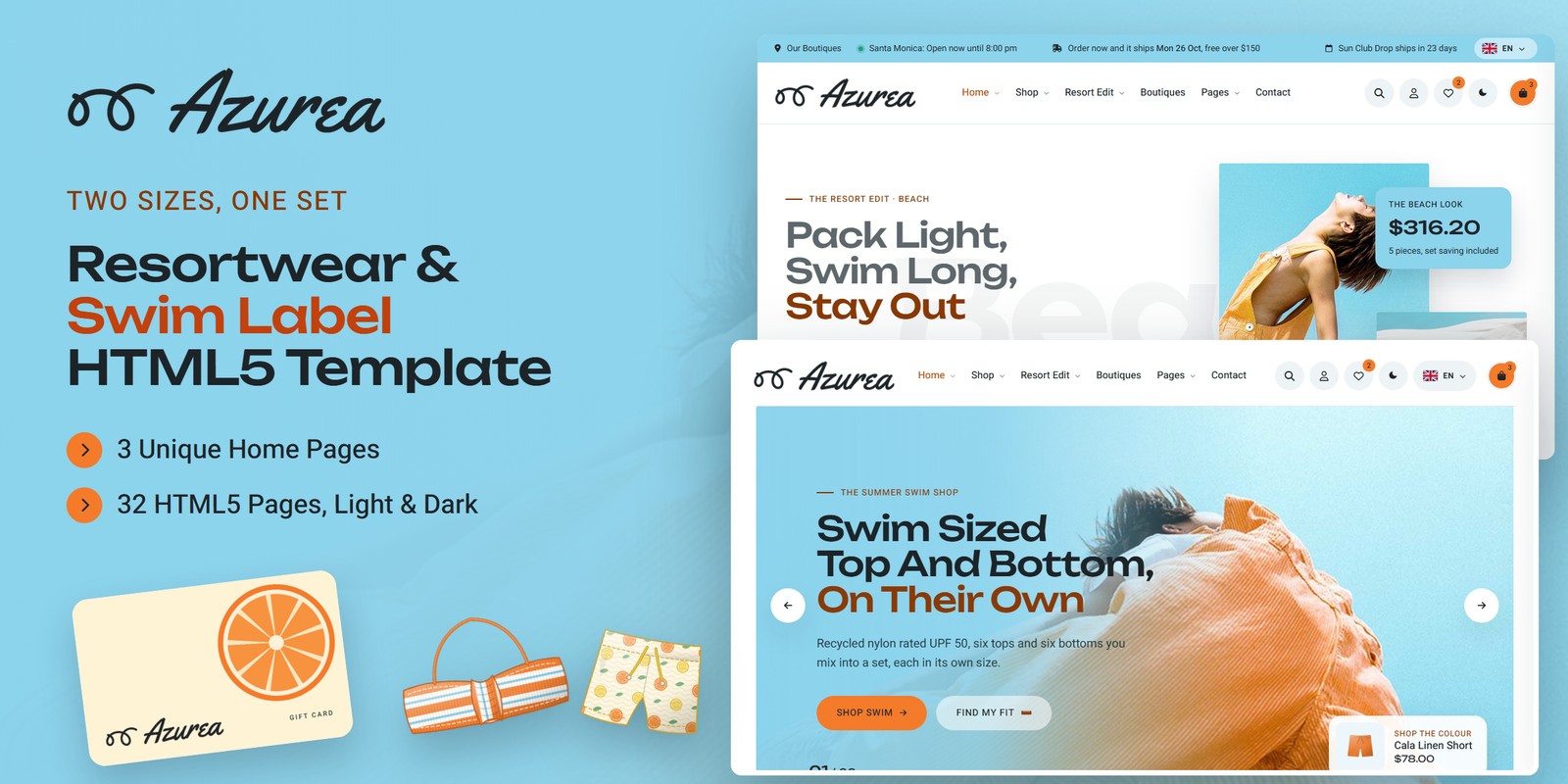
A sunny, friendly HTML template for a resortwear and swim label: bikini tops and bottoms, one-pieces, linen and cover-ups, hats, towels and totes. Azurea ships three home pages, a light and a dark theme, right-to-left support and shop logic that is worked out rather than typed in: tops and bottoms sized on their own charts, any top and any bottom priced as a set, summer drops dated from today, the share of UV each fabric blocks, gift cards and a full bag.
What’s included
- 3 home pages, each with its own scroll moment: tops and bottoms cycle on mix & match reels with the set price, a linen shirt swings on a washing line, a beach umbrella opens
- 26 products with 62 drawn packshots (one per colourway), sizes with stock, fabrics with their UPF
- A swim fit finder (top from underbust and cup fit, bottom from waist and hips) whose sizes follow you through the shop
- Mix & match sets at 15% off the pair, worked out in the bag for any number of tops and bottoms
- The resort edit by destination, 3 pre-order drops with Monday ship dates and a 30% deposit, a UPF calculator and gift cards
- Bag with a free-shipping meter, discount code, tax and a three-step checkout (delivery or boutique pickup) with an order number; order tracking; an account with saved sizes and pre-orders
- Light and dark mode, right-to-left stylesheets with a flag language picker, a WebGL citrus drift and the wave mark drawn by a harmonograph in the footer
- Towel Unroll preloader, Sail Fill reveals, a UPF badge that flips in on card hover, Swiper sliders and Fancybox galleries
- Fully responsive, every page in light and dark, right to left
Getting Started
Thank you for choosing Azurea. Follow the steps below to get your site live.
1. Open locally
Unzip the downloaded package and open azurea/index.html in any modern browser. No build tools or server
are required — the shop, the bag, the fit finder, mix & match, the drops and the gift cards all work straight
from the files.
2. Deploy to a server
Upload the contents of the azurea/ folder to your hosting provider using an FTP client or your hosting
control panel. Once uploaded, navigate to your domain and the template will load immediately.
3. Customise
All custom styling lives in assets/css/style.css (with a numbered Table of CSS at the top) and
assets/css/responsive.css. Colours and fonts are CSS variables — see Colors &
Fonts. Products, sizes, fabrics, drops, boutiques and shop rules live in one place — see
Shop Logic.
<product-slug>-<colour>.png; the
engine finds each colourway’s file by that name, so keep new product images to the same pattern and proportion
(960×1152).File Structure
Below is an overview of the key files and folders included in this template.
index.html / homepage-2.html / homepage-3.html | Three home pages: The Swim Shop (mix & match reels), The Resort Edit (the washing line) and Summer Pre-Order (the beach umbrella) |
shop.html | Every piece with piece tabs, size, colour, destination, UPF, price and new / sale / pre-order filters, sort and search |
product-single.html | A product: colourway gallery, sizes from the fit finder, the matching bottom at the set price, size chart, fabric and UPF, delivery, reviews |
mix-and-match.html | Pick any top and any bottom, each in its own colour and size, at the set price |
fit-finder.html / size-guide.html | The three-step swim fit finder (top, bottom, your sizes) and the size charts |
gift-cards.html | The gift card wizard with a live preview |
cart.html / checkout.html / wishlist.html | The bag with the set saving and the free-shipping meter, the three-step checkout (delivery or boutique pickup) with an order number, the wishlist |
order-tracking.html | Find an order and see its stage, shipped or ready for pickup |
resort-edit.html | Beach, city and boat looks with their totals and packing lists |
pre-order.html | The summer drops: ship dates, closing dates, the countdown and the deposit |
fabric-guide.html | The UPF calculator and every fabric side by side |
lookbook.html | The campaign looks, filterable, each priced |
boutiques.html | The three boutiques with open-now lines, hours and pickup times |
about.html / team.html / team-details.html | The story, values and team; a team member’s profile |
reviews.html | The reviews with the rating split and a review form |
faq.html | Questions by topic with search |
blog.html / blog-details.html | The journal (standard, video, audio, gallery and quote posts) and a post with comments |
my-account.html / login.html / register.html / forgot-password.html | The account (orders, saved sizes, pre-orders) and the account forms |
contact.html | Boutique cards, the map and the contact form |
coming-soon.html / 404.html | A countdown to a new boutique; the error page |
sendmail.php | AJAX mail handler for the contact form (see Contact Form) |
assets/css/style.css | All custom styles, numbered Table of CSS (16 sections) |
assets/css/responsive.css | Desktop-first breakpoints 1399 / 1199 / 991 / 767 / 575, plus wide screens from 1600 and 1960 |
assets/css/style.rtl.css / responsive.rtl.css | The right-to-left twins (see RTL) |
assets/css/plugins/ | Bootstrap (LTR and RTL), Swiper, Fancybox (vendor CSS) |
assets/js/main.js | All custom scripts, numbered JS INDEX (39 blocks) |
assets/js/plugins/ | jQuery, Bootstrap, Swiper, Fancybox, GSAP, ScrollTrigger |
assets/img/ | Images, one folder per section (see Images) |
assets/fonts/theme-icons/ | The sun and moon of the theme switch, loaded locally |
assets/webfonts/ + assets/css/fontawesome-all.css | Font Awesome Free, loaded locally |
Folder Structure
The package unzips to two folders: Documentation/ (this guide) and azurea/, the template.
azurea/
├── *.html                              the 32 pages, all in the root (see File Structure)
├── sendmail.php                        the AJAX mail handler for the contact form
└── assets/
    ├── css/
    │   ├── style.css / style.rtl.css   all custom styles (and the right-to-left twin)
    │   ├── responsive.css / .rtl.css   breakpoints 1399 / 1199 / 991 / 767 / 575
    │   ├── fontawesome-all.css         Font Awesome Free, loaded locally
    │   └── plugins/                    bootstrap (+ rtl), fancybox, swiper
    ├── js/
    │   ├── main.js                     all custom scripts, numbered JS INDEX (39 blocks)
    │   └── plugins/                    bootstrap, gsap, jquery, fancybox, ScrollTrigger, swiper
    ├── fonts/theme-icons/              the sun and moon of the theme switch
    ├── webfonts/                       Font Awesome Free font files
    └── img/                            images, one folder per section
        ├── art/                         7 files
        ├── banner/                      15 files
        ├── blog/                        6 files
        ├── edit/                        3 files
        ├── faces/                       6 files
        ├── flags/                       6 files
        ├── gallery/                     3 files
        ├── icons/                       26 files
        ├── logo/                        5 files
        ├── lookbook/                    22 files
        ├── menu/                        3 files
        ├── products/                    62 files
        └── team/                        6 files
Colors & Fonts
The whole design is driven by CSS variables declared at the top of style.css. Colours used with transparency
have an -rgb twin (for example --az-sky-rgb) — change both together.
--az-apricot--az-apricot-text--az-sky--az-mist--az-ink--az-night--az-white--az-text--az-lemon--az-seaWhite carries the pages; sky fills the bands (mix & match, the washing line, the fabric scores, the page titles) and the footer, with ink copy on it; sky mist is the light band and the packshot plates. Apricot fills the buttons (with ink text), the sale badges and the warm word in each headline; its deeper ink writes small apricot text on light grounds. Lagoon night is the photo-band wash and the dark theme’s ground.
Fonts
Two Google Fonts: Unbounded (headings, prices, big figures) and Heebo (body, navigation,
buttons, labels). Swap them by editing the Google Fonts link and --az-ff-head / --az-ff-body.
Logo
The logo — the label’s wave mark (a harmonograph curve, a wave building into its curl) beside
“Azurea” in a surf script — ships as PNG files in assets/img/logo/: logo.png
(light grounds), logo-light.png (dark grounds and dark mode), the mark alone (mark.png,
mark-light.png) and favicon.png.
Light & Dark Mode
Every header (and the mobile menu) has a theme switch. The choice is saved under azurea-theme and applied by a
one-line script in the <head> before the page paints. The switch sets data-theme="dark" on
<html>.
--az-bg--az-surface--az-mist-bg--az-heading--az-textThe dark colours live in the [data-theme="dark"] block right after :root; the sky bands turn into
an evening sea (.is-sky), the photo bands keep their wash, the line icons and logos switch to their light twins.
Shop Logic
Every figure comes from one data block, JS block 09 Azurea Data (var AZUREA)
near the top of main.js. Edit it once and the cards, charts, reels, prices, dates and totals follow.
Products
Each product has its piece (tops, bottoms, one, resort, acc), style, price (and
was when on sale), colours (its colourways, the first shown on its card), stock per size
(0 = sold out in that size, struck through), fabric, dest (beach, city, boat), tops their
cups, bottoms their coverage, and drop when it is a pre-order piece.
The fit finder: two charts, two sizes
A top is sized from the underbust (XS 63–67; S 68–72; M 73–77; L 78–82; XL 83–88 cm) with a cup fit from bust minus underbust (A - B Cup up to 14 cm, C - D Cup up to 18 cm, DD - E Cup above); a bottom
from waist and hips, each on its own chart, the larger size winning. A measurement between two sizes takes
the larger; a one-piece takes the larger of the top and bottom sizes. The sizes are saved (azurea-fit-v1) for
the shop’s size filter, the quick view and every product page.
Mix & match: the set price
Any top and any bottom bought together cost 15% less than the two prices (setOff), in whole
cents rounded half up. In the bag every top is paired with a bottom, dearest with dearest, and each pair gets the set price.
Summer pre-order
Each drop ships on the Monday on or after shipIn days from today, so the dates never go stale; its order book
closes closes days before. A pre-order pays 30% today (preorder.deposit) and
the rest, with its tax, on the day the drop ships; the bag shows both.
Fabric and UPF
Each fabric has its mix, weight, upf, chlorine life in hours and drying time. UPF says how much UV gets through:
a fabric blocks 1 − 1 / UPF of it — UPF 50 blocks 98%, UPF 30 96.7%. Under a fabric, the UV index
left on the skin is the index divided by the UPF.
Shipping, discount, tax and pickup
Orders placed before 2:00 pm Monday to Friday ship that day; later ones the next working day, arriving
2 days after dispatch. Shipping is $8.00, free from $150.00 and on boutique
pickup. The code SUNNY10 takes 10% off after the set saving; tax is 7.25% of the goods; gift cards
carry no tax. A pickup is ready 90 minutes after an order in opening hours, rounded up to 15 minutes.
SUNNY10 $21.02 more comes off, goods $189.18, free shipping, tax $13.72 —
$202.90. At Santa Monica on a Tuesday, an order placed at 2:05 pm is ready at 3:45 pm; one
placed at 8:00 am at 11:30 am.The bag, wishlist, discount code, orders, saved sizes and the pickup choice are kept in the browser
(localStorage). The first visit starts with a small demo bag; set the demo lists in doShop()
(block 31) to [] to start empty. Gift cards are block 33.
WebGL & Motion
One small runner draws the citrus layer: orange and lemon slices drifting up the side edges of the sky bands, the page titles and the footer, kept inside the page margin beside the content. Each is one canvas:
<canvas class="az-gl" data-gl="citrus" aria-hidden="true"></canvas>Colours come from --gl-1, --gl-2, --gl-3 and --gl-alpha on the section. The
footer’s harmonograph (<canvas data-harmo>) draws the logo’s wave mark from the same pendulum
constants as the logo, a little out of step each time; its ink and pen colours are --harmo-ink and
--harmo-pen. The umbrella (data-umbrella) and the washing line (data-line-scene) are
canvas drawings too. Everything runs only while on screen; reduced motion gets one still frame.
az-sail on a photo or card brings it in from the reading side like a sail
catching wind (94% wide, billowing to 102%, settling at its own size); az-fade and the children of
az-title rise softly into place. data-delay="0.2" staggers any of them.RTL (Right To Left)
Right to left comes from the stylesheets, not from separate pages: the flag language picker lists the languages that
read each way. Choosing Arabic stores the direction (azurea-dir) and reloads; the head script sets
dir="rtl" and swaps the three stylesheets for the files named in their data-rtl attribute.
Nothing is translated. To make a page right to left for good, add dir="rtl" to its <html>
and load bootstrap.rtl.min.css, style.rtl.css and responsive.rtl.css in place of
the three LTR files.
style.rtl.css keep what must not mirror (prices, the reels, the line). Regenerate with
npx rtlcss style.css style.rtl.css and copy the fixes back.JavaScript Guide
All custom behaviour lives in assets/js/main.js, organised into 39 numbered blocks:
- 01–08 — Preloader, Sticky Header, Offcanvas Menu, Scroll Reveals, Back To Top, Anchor Scroll, Light & Dark Mode, Direction, WebGL Citrus Drift. The core every page shares: the Towel Unroll preloader, the header, the Sail Fill reveals, the theme and direction switch and the WebGL citrus drift.
- 09–10 — Azurea Data, Label Engine & Clocks. Azurea Data holds every figure; the Label Engine sizes tops and bottoms, prices sets, dates the drops, works out UPF shares and runs the boutique hours, pickup and dispatch clocks.
- 11–19 — Custom Select, Figures, Rings & Meters, Hero Sliders, Card Sliders, Accordion, Filter Tabs, Grid Search, Newsletter, Choice Cards. Shared components: selects, figures and meters, sliders, accordions, filters, grid search, newsletter, choice cards.
- 20–30 — Quick View, Footer Harmonograph, Mix & Match, Washing Line, Search, Beach Umbrella, Swim Fit Finder, The Resort Edit, Summer Pre-Order, Fabric & UPF, Contact Form. The quick view, the footer harmonograph, the three scroll moments (mix & match reels, the washing line, the beach umbrella), search, the fit finder, the resort edit, the pre-order drops, the fabric guide and the contact form.
- 31–39 — Shop Engine, Account Forms, Gift Cards, Article Tools, Demo Forms, Order Tracking, My Account, Launch Countdown, FAQ Search. The shop (bag, set saving, coupon, checkout, wishlist), account forms, gift cards, articles, demo forms, order tracking, the account, the launch countdown and the FAQ.
Each block is a self-contained doSomething() that skips pages without its section. Every animation respects
prefers-reduced-motion.
Images
The package ships with neutral placeholder photographs at the correct dimensions. Replace them with your own using the same
file names. Images are grouped inside assets/img/:
img/art/ | Drawn art: the washing line’s shirt, towel and short, the peg and the three gift card designs (PNG, included) — 7 files: 900×570, 520×581, 400×354, 360×770, 44×124 |
img/banner/ | Hero slides, photo bands and drop photographs — 15 files: 2730×1693, 1300×806, 2812×2812, 1920×1100, 1021×1527, … |
img/blog/ | Journal posts — 6 files: 1300×806, 1540×1267, 1382×1382, 1384×998, 1200×900, … |
img/edit/ | The resort edit’s beach, city and boat photographs — 3 files: 1429×1225, 600×825, 800×714 |
img/faces/ | Round reviewer portraits — 6 files: 320×320 |
img/flags/ | The language picker’s flags (SVG, included) — 6 files: SVG |
img/gallery/ | The boutiques — 3 files: 1200×900, 1300×806, 800×658 |
img/icons/ | Line icons: sun, wave, recycled, chlorine, wind, flax, tape, set, calendar, gift, truck, boutique, umbrella (included) — 26 files: 128×128 |
img/logo/ | Logo, light logo, the wave mark and the favicon (included) — 5 files: 482×104, 520×285, 64×64 |
img/lookbook/ | The campaign looks and gallery photographs — 22 files: 800×800, 550×550, 600×825, 1100×1100, 800×581, … |
img/menu/ | Home previews in the mega menu — 3 files: 560×350 |
img/products/ | Drawn packshots, one per colourway, on transparent ground (PNG, included) — 62 files: 960×1152 |
img/team/ | Team portraits — 6 files: 800×824 |
The logo files, the drawn packshots, the gift card designs, the washing line’s pieces, the icons and the language flags are included. All demo photography on the live preview is for preview purposes only and is not included in the download.
Contact Form
The contact form posts to sendmail.php, a lightweight AJAX mail handler; the message appears under the button
without reloading the page. The newsletter, checkout, gift card, comment, review and account forms are demo forms that confirm
on screen. To activate the mail handler:
1. Set your email address
$email = 'example@example.com';2. Upload to a PHP host
The form needs PHP mail() support. On a local computer or a static host it shows an “upload to a
PHP-enabled host” notice instead.
3. Optional: enable Google reCAPTCHA v3
- Create v3 keys for your domain in the Google reCAPTCHA admin console
- In
sendmail.php, replaceYOUR_RECAPTCHA_V3_SECRET_KEYwith your secret key - In
contact.html, add a hidden token field inside the form and load the script with your site key:
<input type="hidden" name="g-recaptcha-response" id="g-recaptcha-response">
<script src="https://www.google.com/recaptcha/api.js?render=YOUR_SITE_KEY"></script>
<script>
  grecaptcha.ready(function () {
    grecaptcha.execute('YOUR_SITE_KEY', { action: 'contact' }).then(function (token) {
      document.getElementById('g-recaptcha-response').value = token;
    });
  });
</script>
Credits
- Bootstrap 5.3.3
- jQuery 3.7.1
- Swiper 11
- GSAP 3 + ScrollTrigger
- Fancybox 3.5
- Font Awesome Free
- RTLCSS
- Google Fonts: Unbounded, Heebo
All plugin files and icon fonts are loaded locally. The only external requests are the Google Fonts stylesheet, the Google Maps embed and the video popup.
Support
If you have any questions or need help with the template, please reach out through the marketplace where you purchased the template: open the item there and send us your question from its support page. We aim to respond within 24–48 hours.