Overview
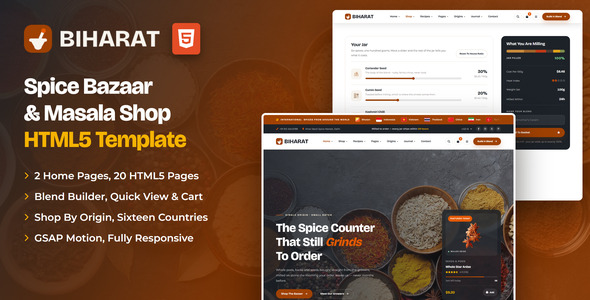
A modern, animation-rich HTML template for spice merchants, masala brands, single-origin importers and specialist food shops. Biharat ships two distinct homepages — a counter-led design and a market-floor variant — plus a working shop with live filtering and sorting, a product page whose price recalculates from weight and grind, a cart that does real arithmetic, and a blend builder that mills a custom jar to a ratio the visitor sets themselves.
What’s included
- 2 homepage designs (the counter and the market floor)
- Shop with live shelf, price-range and grind filtering, four sort orders and a grid / list toggle — the result count always matches what is on screen
- Product details with weight and grind options that recompute the price from a real per-gram rate, plus a thumb-driven gallery and tabbed content
- Blend Builder: six sliders that must total 100%, with a live cost per 100g, a heat index and a stacked ratio bar
- Shopping cart with quantity steppers, line totals, a coupon code and a free-delivery threshold that all recalculate together
- Sourcing page with origin cards and a farm-to-jar route, recipe archive with real heat filtering, recipe details, about, contact with a working PHP form and map
- Journal grid, journal list and a full article page with sidebar, author box, prev / next and comments
- Login, register, forgot password, 404 and a minimal-chrome coming soon page with a live countdown
- GSAP motion throughout: a split-panel preloader, mask-up headlines, a pinned horizontal Grind Room, a scroll-driven spice marquee and parallax
- Three product card designs (label, stock and standard), Swiper sliders, animated counters, a basket drawer that persists across pages
- Origins mega menu, a looping flag strip and a shop-by-origin filter covering sixteen countries
- Quick-view panel on every product card, a saved-items heart, and a custom select control with full keyboard support
- Fully responsive, W3C-valid, zero console errors
Getting Started
Thank you for choosing Biharat. Follow the steps below to get your shop live.
1. Open locally
Unzip the downloaded package and open index.html in any modern browser (Chrome, Firefox, Edge, Safari). No build tools or server are required — all files are ready to use as-is.
2. Deploy to a server
Upload the entire template folder to your hosting provider using an FTP client (such as FileZilla) or your hosting control panel. Once uploaded, navigate to your domain and the template will load immediately.
3. Customise
All custom styling lives in assets/css/style.css (with a numbered Table of CSS at the top) and assets/css/responsive.css. Colours and fonts are controlled by CSS variables — see Colors & Fonts below.
assets/img/ with your own photography at the same dimensions for the best result. Every image folder is named after the section that uses it.
File Structure
Below is an overview of the key files and folders included in this template.
index.html / homepage-2.html | Two homepage designs (the counter and the market floor) |
shop.html | Shop with shelf, price and grind filters, sorting and a list view |
product-details.html | Single spice with live weight / grind pricing, gallery and reviews |
blend-builder.html | Custom masala builder with live cost, heat index and ratio bar |
cart.html / checkout.html | Basket with real totals, coupon and delivery rule; checkout form |
sourcing.html | Origin cards and the farm-to-jar route |
recipes.html / recipe-details.html | Recipe archive with heat filtering, full recipe with method steps |
about.html | Story, values, stats band and the team behind the counter |
contact.html | Contact form, info cards and map |
blog.html / blog-list.html / blog-single.html | Journal grid, list layout and article with sidebar & comments |
login.html / register.html / forgot-password.html | Account pages |
coming-soon.html / 404.html | Utility pages (live countdown, error page) |
sendmail.php | Contact form mail handler (see Contact Form) |
assets/css/style.css | All custom styles, numbered Table of CSS |
assets/css/responsive.css | Desktop-first breakpoints: 1399 / 1199 / 991 / 767 / 575 |
assets/css/plugins/ | Bootstrap, Swiper (vendor CSS) |
assets/js/main.js | All custom scripts, numbered JS INDEX (25 blocks) |
assets/js/plugins/ | jQuery, Bootstrap, Swiper, GSAP, ScrollTrigger |
assets/img/ | Images grouped per section (banner, about, blog, bg, logo, products …) |
assets/vids/ | The looping hero video used on homepage 2 |
assets/fonts/flaticon/ | The spice icon font (whole spice, ginger, anise, herb, condiment …) |
assets/webfonts/ + assets/css/fontawesome-all.css | Font Awesome Free, loaded locally |
Colors & Fonts
The whole design is driven by CSS variables declared at the top of style.css. Change a token once and every section, button and card updates.
--bh-color-cinnamon--bh-color-paprika--bh-color-ink--bh-color-cream--bh-color-saffronEach colour also has an -rgb companion where a translucent version is needed, and the type scale is set with clamp() in --bh-fs-h1 through --bh-fs-h6 so headings resize with the viewport without a single media query.
Fonts
Two Google Fonts are loaded in the head of each page: Bricolage Grotesque (headings, figures and display type) and Montserrat (body text, buttons and navigation). Swap them by editing the Google Fonts link and the --bh-ff-display / --bh-ff-body variables.
Shop & Blend Logic
Nothing in this template is a static mock-up — every number on screen is calculated from the markup, so your own products behave correctly the moment you swap the data in.
Filtering and sorting
Each product sits in a .prod-item wrapper carrying its own data attributes. JS block 11 Product Filter reads them, so the shelf list, price slider, grind checkboxes, sort menu and result count all work from the same source of truth:
<div class="col-xl-4 col-md-6 prod-item"
     data-cat="whole"          <!-- shelf key, matches the sidebar buttons -->
     data-order="1"            <!-- the Featured order -->
     data-price="9.20"         <!-- price per 100g, drives sorting + range -->
     data-rating="4.9"
     data-grind="whole coarse" <!-- space separated grind options -->
     data-id="star-anise" data-name="Whole Star Anise"
     data-unit="100g" data-img="assets/img/veg/6.webp">
The same block powers the recipe archive — the heat tabs on recipes.html use data-cat="mild | medium | hot" on the identical wrapper.
Weight and grind pricing
The buy box on product-details.html stores a per-gram rate and derives everything from it, so any jar size and grind combination stays consistent:
<div class="pd-buy-box" data-per-gram="0.148" data-id="ceylon-cinnamon" …>
  <button data-grams="250">250g</button>
  <button data-fee="0.80">Fine Powder</button>   <!-- milling surcharge -->
Price = per-gram × grams + grind fee, multiplied by the quantity. The “works out at … per 100g” line underneath is derived from the same figure.
The blend builder
Each row on blend-builder.html declares its cost per 100g, a heat score from 0 to 10 and the colour it takes in the ratio bar:
<div class="bb-row" data-cost="8.40" data-heat="9"
     data-color="#C03A16" data-default="18">
The panel totals the sliders, normalises the cost and heat to a full 100g jar, renders the stacked bar, and only enables Add To Basket when the sliders add up to exactly 100%. Change a row’s numbers and the maths follows automatically.
Origins
Every product card carries data-origin (a two-letter country code) and data-origin-name. The flag strip, the Origins mega menu, the Shop By Origin cards on Home 02 and the counted list in the shop sidebar all read from the same codes, and flags resolve to assets/img/flags/<code>.svg. To change a country, swap the code — 271 flags ship with the template.
Quick view
The eye on a product card opens .bh-quickview, filled from the card it was clicked on — no per-product markup to maintain. Grind options come from data-grind; the first grind listed is the shelf price and each further milling pass adds a fee, so the panel and the card never quote different numbers. Add To Basket goes through the same cart store as the rest of the template.
The basket
JS block 10 Cart Store keeps the basket in localStorage under the key biharat-cart, which is why the drawer stays in step as you move between pages. It falls back to an in-memory basket when storage is blocked. On cart.html the free-delivery threshold and flat rate sit at the top of block 22 Cart Page:
var FREE_OVER = 60;
var SHIPPING  = 6.5;
The demo coupon code is SPICE10 (10% off) — swap it for your own logic or hand the form to your backend.
JavaScript Guide
All custom behaviour lives in assets/js/main.js, wrapped in a jQuery IIFE and organised into numbered blocks (see the JS INDEX comment at the top of the file):
- 01–04 — Preloader, sticky header, offcanvas menu, search popup
- 05–07 — Scroll reveals, hero slider, scroll-driven spice marquee
- 08–09 — Category rail, pinned horizontal Grind Room
- 10–12 — Cart store, product filter and sorting, animated counters
- 13–15 — Recipe, testimonial and bazaar sliders
- 16–19 — Parallax, scroll-rotated seal, back to top, newsletter form
- 20–22 — Product options and gallery, blend builder, cart page
- 23–25 — Countdown, AJAX contact form, product rail
- 26–27 — Home 02 cinema slider, quick-view panel
- 28–29 — Saved items, custom select control
- 30 — Custom cursor
Each block is a self-contained doSomething() function that safely skips pages where its section is not present — you can delete any block you do not need. Every animation respects prefers-reduced-motion automatically, and any element hidden for a reveal is un-hidden on every skip path so content is never left invisible.
prefers-reduced-motion, and the native pointer is never hidden. Restyle it in CSS section 1.6 Cursor & Selection, or remove JS block 30 and the two .bh-cursor-* divs to drop it.data-target attribute of .countdown — set it to your launch date, e.g. data-target="2027-01-01T09:00:00"..bh-preloader markup from each page.Images
The download package ships with neutral placeholder images so you can see every layout at the correct dimensions. Replace them with your own photos using the same file names, or update the src attributes. Images are grouped by section inside assets/img/.
The logo files, the favicon and the payment badges are included and ready to use. All demo photography shown on the live preview is for preview purposes only and is not included in the download.
object-position: center top so heads and jar lids are never clipped. Keep your replacements at the same aspect ratio and the crops stay correct.Contact Form
The contact page posts to sendmail.php, a lightweight AJAX mail handler — the success or error message appears under the Send button without reloading the page. To activate it on your server:
1. Set your email address
Open sendmail.php and replace the placeholder recipient at the top of the file with your own address:
$toEmail = 'hello@yourdomain.com';2. Upload to a PHP host
The form needs a server with PHP mail() support (virtually every shared host). It will not send from your local computer or from a static-only host — there the form shows a friendly “upload to a PHP-enabled host” notice instead.
3. Optional: enable Google reCAPTCHA v3
Invisible reCAPTCHA v3 spam protection is already built into the handler. It stays dormant until the form submits a token — that is why no badge or checkbox appears out of the box. To switch it on:
- Create v3 keys (a site key and a secret key) for your domain in the Google reCAPTCHA admin console
- In
sendmail.php, replaceYOUR_RECAPTCHA_V3_SECRET_KEYwith your secret key - In
contact.html, add a hidden token field inside the form and load the reCAPTCHA script with your site key just before</body>:
<!-- inside the contact form -->
<input type="hidden" name="g-recaptcha-response" id="g-recaptcha-response">

<!-- before the closing </body> tag -->
<script src="https://www.google.com/recaptcha/api.js?render=YOUR_SITE_KEY"></script>
<script>
  grecaptcha.ready(function () {
    grecaptcha.execute('YOUR_SITE_KEY', { action: 'contact' }).then(function (token) {
      document.getElementById('g-recaptcha-response').value = token;
    });
  });
</script>
Once the token field is present, sendmail.php verifies every submission with Google automatically and rejects low-score (bot) requests.
The newsletter, comment, checkout and account forms are front-end only by default — point their action attributes at your backend of choice.
Credits
This template is built using the following open-source libraries and resources.
- Bootstrap 5.3
- jQuery 3.7.1
- Swiper 11
- GSAP 3 + ScrollTrigger
- Font Awesome Free
- Flaticon spice icon set
- Google Fonts: Bricolage Grotesque, Montserrat
All plugin files and icon fonts are loaded locally. The only external requests are the Google Fonts stylesheets and the optional Google Maps embed.
Support
If you have any questions or need help with the template, please reach out through our ThemeForest profile. We aim to respond within 24–48 hours.