Overview
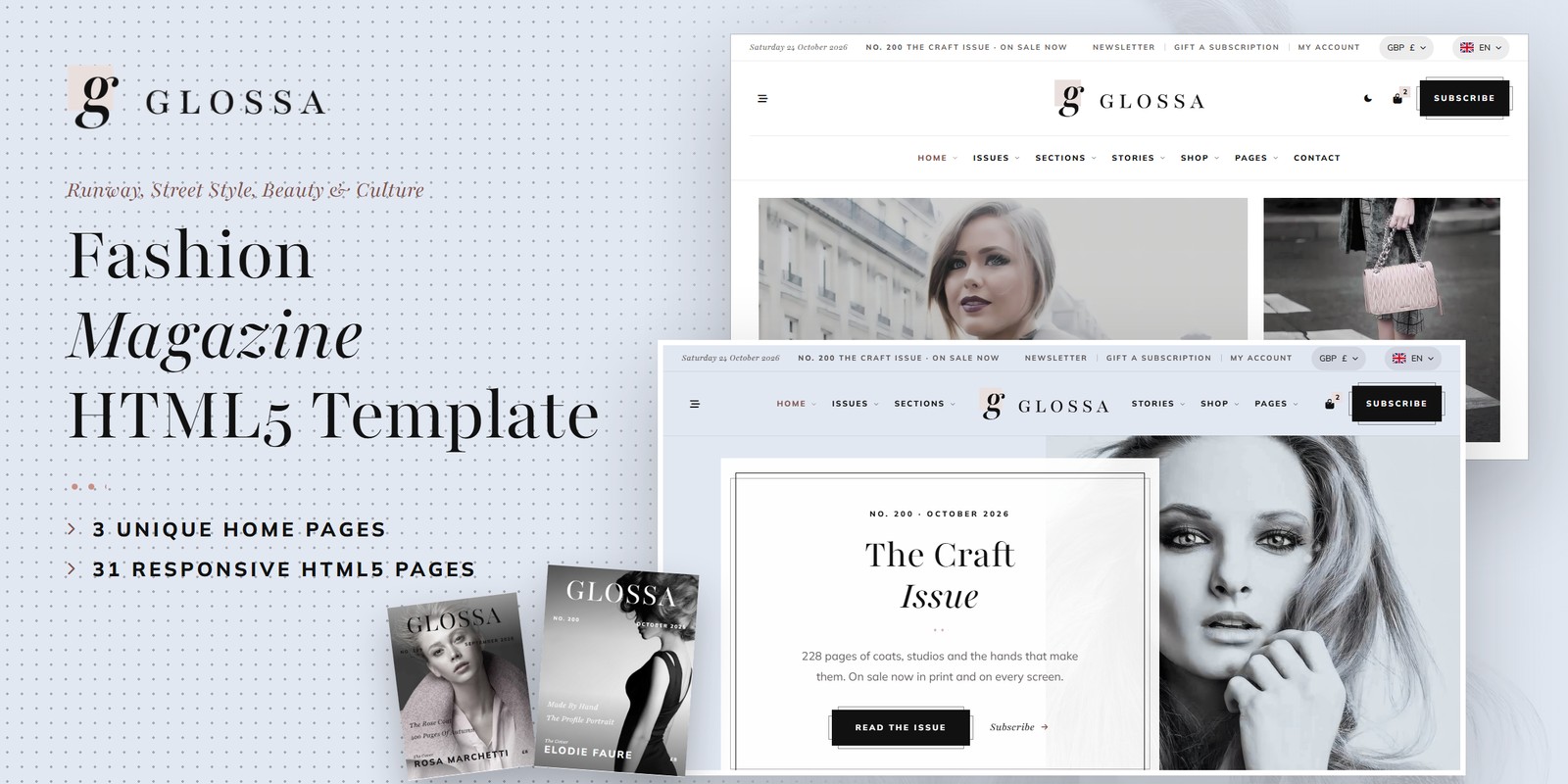
An HTML template for a monthly fashion magazine: runway, street style, beauty and culture, in print and on screen. Glossa ships three home pages, a light and a dark theme, right-to-left support, a pound / dollar / euro switch, and logic that is worked out rather than typed in: issues that go on sale on the first Thursday of the month and number themselves from the date; covers drawn in CSS; subscriptions priced by format, term and region with the first issue from the cut-off; a gift wizard; shoppable stories with the look’s total; a most-read chart counted from the stories; newsletters with their next send; and a shop with a bag, coupon, delivery zones and VAT.
What’s included
- 3 home pages, each with its own scroll moment: The Contents Page (the page numbers fly to their stories), The Mood Board (the street photographs snap into the board) and The Pull Quote (an essay’s quote grows to fill the band)
- A white theme by default and a dark theme on one switch, remembered between visits and applied before the page paints
- Right-to-left stylesheets and a flag language picker: a right-to-left language turns any page around
- A WebGL glyph drift of soft letters in the bands and the page titles, and the footer’s masthead breathing on the typeface’s weight and width
- The issues archive: 12 covers drawn in CSS from the date, print or digital, print copies left, year and stock filters, search
- Subscriptions: 3 formats, 3 terms, 4 delivery regions, a student rate, a five-step wizard; the gift wizard with a card, a message and the start issue
- Shoppable stories: 4 looks of 16 pieces with sizes and the look’s total; the most-read chart by window and section; newsletter preferences
- 24 stories in four sections and six formats (standard, gallery, video, audio, quote, link), 8 contributors with profiles
- The shop: issues and pieces, filters, sort and search, the product page with sizes, bag, coupon, delivery zones, VAT included, checkout with an order number, wishlist
- About, newsletter, FAQ with search, contact with the reader desk’s hours, the form and the map, account pages, coming soon, 404
Getting Started
- Unzip the package and open
glossa/index.htmlin a browser — no build step is needed. - Edit the pages in any code editor. Each section is wrapped in
<!-- name-area start here -->/<!-- name-area end here -->comments, so it is easy to find, move or remove. - Change the magazine’s figures (issues, prices, stories, looks, sends) in one place: the data block in
assets/js/main.js(see Magazine Logic). - Upload the contents of
glossa/to your web host. The contact form needs PHP (see Contact Form).
File Structure
Below is an overview of the key files and folders included in this template.
index.html / homepage-2.html / homepage-3.html | Three home pages: The Magazine (the contents page), Street Style (the mood board), The Long Read (the pull quote) |
issues.html / issue-details.html | The archive of covers with year, stock and search; the issue on sale with its contents, print and digital and the countdown |
subscribe.html / gift-subscription.html | Plans, the price table by region and the five-step subscription wizard; the gift wizard with the card and the start issue |
sections.html / section-details.html / runway-report.html / most-read.html | The four sections; one section front (Runway); the runway report’s twelve looks; the most-read chart |
stories.html / story-details.html / shop-the-look.html | Every story in its format with filters, search and a sidebar; a story with its pull quote, author, comments; a shoppable story |
contributors.html / contributor-details.html | The masthead with section filters and a pitch form; one contributor with her stories |
shop.html / product-details.html / cart.html / checkout.html / wishlist.html | The shop: issues and pieces, filters, sort and search, the product page with sizes, bag, checkout, wishlist |
about.html / newsletter.html / faq.html / contact.html | The magazine’s story; the newsletter preferences; questions with search; contact with the reader desk’s hours, the form and the map |
account.html / login.html / register.html / forgot-password.html | The account (subscription, issues, orders, details) and the login pages |
coming-soon.html / 404.html | The countdown to the next issue’s on-sale morning, the error page |
sendmail.php | AJAX mail handler for the contact and comment forms (see Contact Form) |
assets/css/style.css | All custom styles, numbered Table of CSS (17 sections) |
assets/css/responsive.css | Desktop-first breakpoints 1399 / 1199 / 991 / 767 / 575, plus wide screens from 1600 and 1960 |
assets/css/style.rtl.css / responsive.rtl.css | The right-to-left twins (see RTL) |
assets/css/plugins/ | Bootstrap (LTR and RTL), Swiper, Fancybox (vendor CSS) |
assets/js/main.js | All custom scripts, numbered JS INDEX (37 blocks) |
assets/js/plugins/ | jQuery, Bootstrap, Swiper, Fancybox, GSAP, ScrollTrigger |
assets/img/ | Images, one folder per subject (see Images) |
assets/fonts/theme-icons/ | The sun and moon of the theme switch, loaded locally |
assets/webfonts/ + assets/css/fontawesome-all.css | Font Awesome Free, loaded locally |
Folder Structure
The package unzips to two folders: Documentation/ (this guide) and glossa/, the template.
glossa/
├── *.html                              the 31 pages, all in the root
├── sendmail.php                        the AJAX mail handler for the forms
└── assets/
    ├── css/                            style.css, style.rtl.css, responsive.css, responsive.rtl.css, plugins/
    ├── js/                             main.js (37 blocks), plugins/
    ├── fonts/theme-icons/              the sun and moon of the theme switch
    ├── webfonts/                       Font Awesome Free font files
    └── img/                            images, one folder per subject
        ├── bands/                       8 files
        ├── beauty/                      11 files
        ├── culture/                     6 files
        ├── faces/                       4 files
        ├── flags/                       6 files
        ├── hero/                        3 files
        ├── icons/                       20 files
        ├── logo/                        4 files
        ├── menu/                        3 files
        ├── pieces/                      16 files
        ├── runway/                      14 files
        ├── street/                      12 files
        └── team/                        8 files
Colors & Fonts
The whole design is driven by CSS variables declared at the top of style.css. Change a token once and every
section, button and card updates. Colours used with transparency have an -rgb twin — change both together.
--gl-nude--gl-powder--gl-ink--gl-rose--gl-rose-ink--gl-bg--gl-soft--gl-line--gl-heading--gl-textWhite is the ground; nude and powder are the panels, the quote cards and the hero; ink sets the type, the buttons and the
closing band. Rose-taupe is the accent of the marks — the three dots under every title, the layout guides of the
reveals, the glyphs — and rose ink its darker twin for small text and links. --gl-bg,
--gl-surface, --gl-panel, --gl-heading and --gl-text are the semantic
names the components use; the dark theme swaps those.
Fonts
Playfair (a variable font: weight, width and optical size) sets the headlines, the italic eyebrows, the
dates, prices and quotes, and the footer’s masthead; Mulish sets the section titles and the menu in
tracked capitals, and the body. Swap them by editing the Google Fonts link and --gl-ff-serif /
--gl-ff-sans.
Logo
logo.png— the italic g on its nude square beside GLOSSA in ink, for white headerslogo-light.png— the same with pale lettering, for photographs and the dark thememark.png— the square and its g alone (the footer rule);favicon.png— the browser tab icon
Light & Dark Mode
Glossa opens white. Every header (and the mobile menu) has a theme switch; the choice is saved under the key
glossa-theme and applied by a one-line script in the <head> before the page paints. The
switch sets data-theme="dark" on the <html> tag.
--gl-bg--gl-surface--gl-panel--gl-panel-2--gl-heading--gl-text--gl-accent-textThe dark values sit in one block, [data-theme="dark"] { … }, right after :root. To open
the site dark for first-time visitors, add data-theme="dark" to the <html> tag of each page.
Magazine Logic
The figures on every page come from one data block, JS block 10 Glossa Data
(var GLOSSA). Pages are printed for the build day and repainted by block
04 Magazine Clock from the visitor’s date, so the magazine never looks out of date.
Issues and covers
Each issue goes on sale on the first Thursday of its month. Its number counts the months since No. 1
(first: { y: 2010, m: 2 }, months from 0). months holds the twelve monthly themes with
the cover star, the cover lines, the pages and the cover photograph; stock the print copies left by age.
Subscriptions
Per issue: the format’s cover price (Print £8, Digital £4.99, Print & Digital £9) less the term’s discount (10% for 3 issues, 20% for 6 issues, 35% for 12 issues), 25% off digital for students, plus postage on each print issue (United Kingdom £0.00, Europe £1.50, USA & Canada £2.50, Rest Of The World £3.20). The total is the per-issue price times the issues; the saving is against buying every issue at the cover price. A print subscription taken by the 20th (23:59) starts with next month’s issue, later with the one after; digital starts at once.
Shoppable stories
looks lists each story’s pieces; pieces holds their prices and sizes (a fragrance’s
larger bottles cost more by sizeFactor).
Most read and newsletters
Each story has its reads (views) and its age in days; a window keeps the stories published inside it and
ranks them by reads. This week’s top three: The Pink Bag Diaries (61,200 reads), The Long Coat Returns (52,600 reads), The Graphic Liner Edit (49,800 reads). The newsletters send at the times in sends: The Daily Edit (Mon, Tue, Wed, Thu, Fri); The Weekly (Sun); Shop The Look (Wed); The Issue (the on-sale morning).
The shop
Prices include VAT: the bag shows the VAT inside the total. Delivery applies to what is posted (pieces and print issues), free in the UK over £50; subscriptions carry their own postage.
GLOSSA10: £20.99 − £2.10 + £3.95 = £22.84.The bag, the wishlist, the coupon, the subscriptions and the orders are kept in the browser (localStorage).
The first visit starts with a small demo bag; to start empty, set the demo lists in doShop() (block
31) to []. Checkout and the wizards confirm on screen with a reference —
connect them to your own systems to take real orders.
WebGL & The Masthead
One small WebGL shader draws the glyph drift: soft Playfair letters drifting slowly through the plain bands, the page titles and the footer. Each layer is one canvas:
<canvas class="gl-gl" data-gl="glyphs" data-gl-count="16" aria-hidden="true"></canvas>- Count —
data-gl-countsets how many letters drift. - Colours — rose, powder and a faint ink:
--gl-1,--gl-2,--gl-3and the strength--gl-alpha. The theme switch repaints them. - Performance — a layer only runs while on screen; reduced motion gets one still frame.
The footer’s masthead (block 11) breathes on Playfair’s weight and width axes and leans heavier and
wider toward the pointer. It is plain text with font-variation-settings; reduced motion keeps it at rest.
RTL (Right To Left)
Right to left comes from the stylesheets, not from separate pages: the language picker lists languages that read left to
right and right to left. Choosing Arabic or Hebrew stores the language and the direction (glossa-lang,
glossa-dir) and reloads; the head script sets dir="rtl" and swaps the three stylesheets for the
files named in their data-rtl attribute. Nothing is translated. To make a page right to left for good, add
dir="rtl" to <html> and swap:
assets/css/plugins/bootstrap.min.css | → assets/css/plugins/bootstrap.rtl.min.css |
assets/css/style.css | → assets/css/style.rtl.css |
assets/css/responsive.css | → assets/css/responsive.rtl.css |
style.css, regenerate the twin with npx rtlcss style.css style.rtl.css and copy the
RTL fixes block at its end back.JavaScript Guide
All custom behaviour lives in assets/js/main.js, wrapped in a jQuery IIFE and organised into 37 numbered
blocks (see the JS INDEX comment at the top of the file):
- Core — blocks 01, 02, 03, 04, 05, 06, 07, 08, 09: the Cover Set preloader, the header, the magazine clock (issues, covers and dates from the visitor’s day), the Paste-Up Guides and word-rise reveals, the theme and direction switch and the WebGL glyph drift.
- Data & money — blocks 10, 11, 12, 13: Glossa Data holds every figure; the footer’s masthead breathes on the font’s axes; the pound / dollar / euro switch repaints every price.
- Components — blocks 14, 15, 16, 17, 18, 19, 20: sliders, accordions, filters, search, the newsletter fields, the choice cards of the wizards.
- Scroll moments — blocks 21, 22, 23: the page numbers flying to their stories (Home 1), the street photographs snapping into the board (Home 2), the pull quote growing to fill the band (Home 3).
- The magazine — blocks 24, 25, 26, 27, 28, 29, 30, 31, 32, 33, 34, 35, 36, 37: the archive, the most-read chart, the subscription engine and its wizards, shoppable looks, newsletter preferences, the reading player, contact, the shop, accounts, articles, the countdown to the next issue, the FAQ.
Each block is a self-contained doSomething() function that skips pages where its section is not present.
Every animation respects prefers-reduced-motion: content appears in its final state.
gl-paste to a block so it sets in from its gutter while a rose
layout guide flashes along its edge (Paste-Up Guides; data-from="left|right|up" picks the side), and
gl-words to a title so its words rise one by one. data-delay="0.2" staggers a block. The pull
quote shows over a story’s photograph on hover from the st-quote span inside the card.data-contents), the mood board (data-moodboard) and the pull quote
(data-pullquote). Each page is authored in the finished state.Images
The download package ships with neutral placeholder images at the correct sizes. Replace them with your own photos using
the same file names. Images are grouped inside assets/img/:
img/bands/ | Page-title banners and photo bands — 8 files: 2809×1317, 2809×2339, 2809×1756, 2809×976 |
img/beauty/ | Beauty stories and the beauty covers — 11 files: 1300×900, 1382×1629, 1300×882, 957×954, 600×850, … |
img/culture/ | Culture stories — 6 files: 1300×900, 1200×766, 1126×1129, 2106×994 |
img/faces/ | Round portraits for letters, comments and avatar groups — 4 files: 200×200 |
img/flags/ | The language picker’s flags (SVG, included) — 6 files: SVG |
img/hero/ | Home 01’s slider portraits — 3 files: 1464×1311, 1200×1200, 1464×1267 |
img/icons/ | Drawn hairline icons, each in an ink and a light version (included) — 20 files: 120×120 |
img/logo/ | Logo, light logo, the mark and the favicon (included) — 4 files: 361×92, 64×64, 77×96 |
img/menu/ | Home previews in the mega menu — 3 files: 560×350 |
img/pieces/ | The pieces sold through the shoppable stories — 16 files: 800×545, 900×900, 1100×793, 1000×1000, 1309×1309, … |
img/runway/ | Runway stories, the report’s looks and covers — 14 files: 600×1356, 800×1289, 800×951, 1000×1220, 800×808, … |
img/street/ | Street style stories, the mood board and the looks — 12 files: 900×900, 1130×1130, 2016×1351, 1024×686, 1300×900, … |
img/team/ | The editors and writers, portraits — 8 files: 1024×843 |
The logo files, the drawn icons and the language flags are included. The covers are built in CSS round a photograph from
the data block (months[].cover). All demo photography shown on the live preview is for preview purposes only
and is not included in the download.
Contact Form
The contact form and the comment form post to sendmail.php, a lightweight AJAX mail handler; the message
appears under the button without a reload. The newsletter, subscription, checkout, account and pitch forms are demo forms:
they confirm on screen and are ready to connect to your own systems.
1. Set your email address
$email = 'example@example.com';2. Upload to a PHP host
The form needs a server with PHP mail() support. Locally it shows an “upload to a PHP-enabled
host” notice instead.
3. Optional: enable Google reCAPTCHA v3
- Create v3 keys for your domain in the Google reCAPTCHA admin console
- In
sendmail.php, replaceYOUR_RECAPTCHA_V3_SECRET_KEYwith your secret key - In
contact.html, add a hidden token field inside the form and load the script with your site key:
<input type="hidden" name="g-recaptcha-response" id="g-recaptcha-response">

<script src="https://www.google.com/recaptcha/api.js?render=YOUR_SITE_KEY"></script>
<script>
  grecaptcha.ready(function () {
    grecaptcha.execute('YOUR_SITE_KEY', { action: 'contact' }).then(function (token) {
      document.getElementById('g-recaptcha-response').value = token;
    });
  });
</script>
Credits
- Bootstrap 5.3.3
- jQuery 3.7.1
- Swiper 11
- GSAP 3 + ScrollTrigger
- Fancybox 3.5
- Font Awesome Free
- RTLCSS
- Google Fonts: Playfair, Mulish
All plugin files and icon fonts are loaded locally. The only external requests are the Google Fonts stylesheet, the Google Maps embed and the video popups.
Support
If you have any questions or need help with the template, please reach out through the marketplace where you purchased the template: open the item there and send us your question from its support page. We aim to respond within 24–48 hours.