Overview
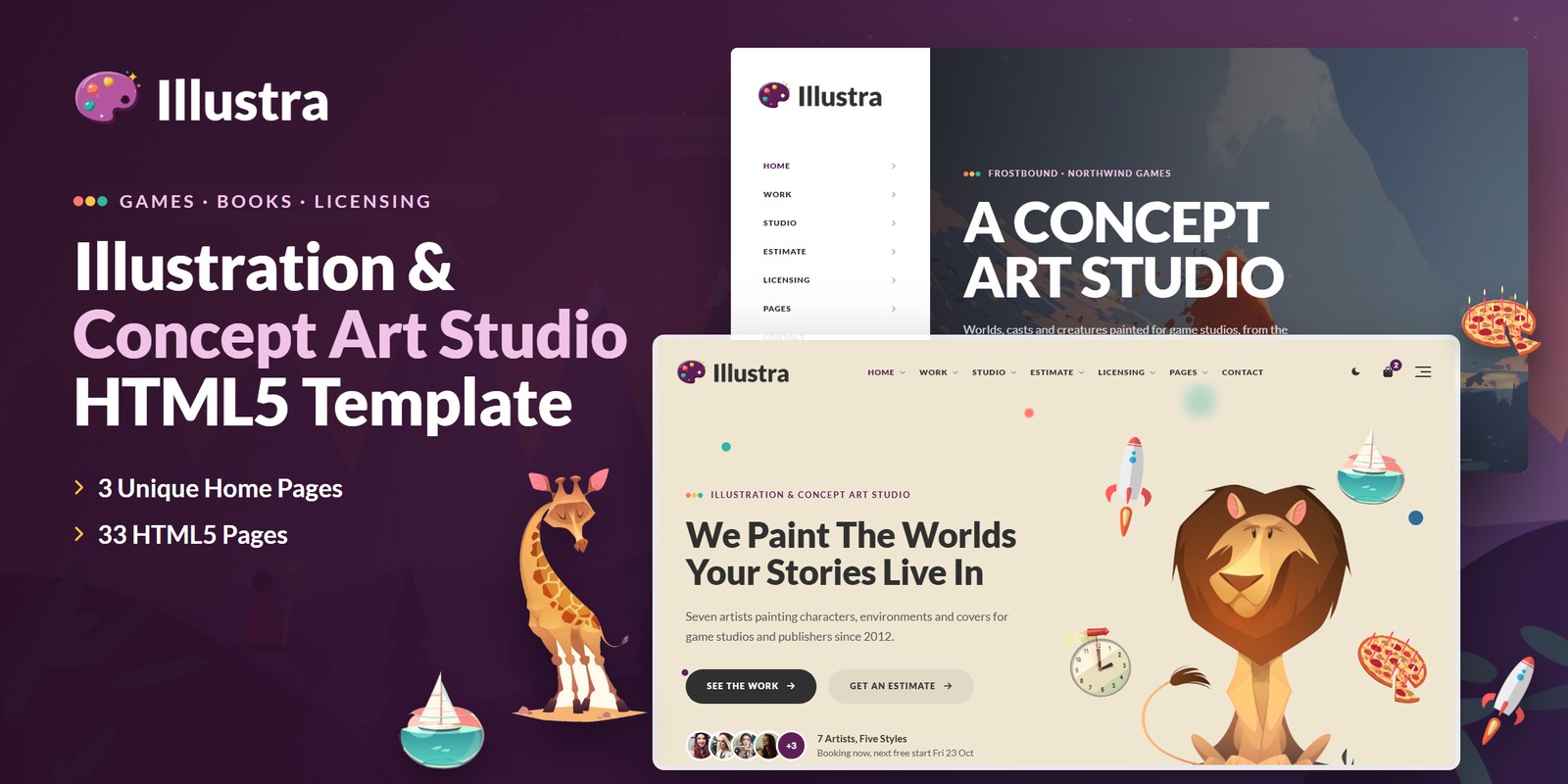
A bright, storybook HTML template for an illustration and concept-art studio of several artists working for game studios and publishers. Every piece sits on its own flat pastel plate; Lato titles, EB Garamond artwork titles, ink pills and one plum accent keep the page calm around the art. Illustra ships three home pages, a light and a dark theme, right-to-left support and logic that is worked out rather than typed in: an estimate builder with a delivery date from the artists’ own queues, the roster filtered by style, licensing by use with a licence library, bag and checkout, projects by client, a five-step brief and a five-step artist application, the studio’s hours on the visitor’s own clock, and a currency switch.
What’s included
- 3 home pages, each with its own scroll moment: a grey blockout painted over layer by layer, a valley coming apart into its depth planes, and a colour script filling beat by beat
- A light theme by default and a dark theme on the switch, remembered between visits and applied before the page paints
- Right-to-left stylesheets and a flag language picker; a currency switch (dollars, pounds, euros) that repaints every price
- WebGL Perspective Guides drifting behind the bands; a creature bust in a clay render turning in the footer
- The Layer Stack preloader, the Quadrant Gather reveal, words rising in titles and palette-chip hovers that show each piece’s key colours
- The estimate builder, the five-step project brief, rates and complexity, how the studio works
- The artists filtered by style with an artist profile; licensing by use with the terms table and a calculator; the licence library, licence page, bag, checkout and wishlist
- All the work with category tabs and search; projects by client; two project layouts
- About, what we make, concept art for games, join the studio, the journal, FAQ with search, contact with a map and the PHP form, account pages, coming soon with a countdown, 404
- Fully responsive from 390 px to wide screens
Getting Started
Thank you for choosing Illustra. Follow the steps below to get your site live.
1. Open locally
Unzip the downloaded package and open illustra/index.html in any modern browser (Chrome, Firefox, Edge,
Safari). No build tools or server are required — the estimate, the roster, licensing, the bag and checkout all
work straight from the files.
2. Deploy to a server
Upload the contents of the illustra/ folder to your hosting provider using an FTP client (such as FileZilla)
or your hosting control panel. Once uploaded, navigate to your domain and the template will load immediately.
3. Customise
All custom styling lives in assets/css/style.css (with a numbered Table of CSS at the top) and
assets/css/responsive.css. Colours and fonts are controlled by CSS variables — see
Colors & Fonts. The artists, the pieces, the rates, the licence terms and the studio hours
live in one place — see Estimates & Licensing.
assets/img/ with your own artwork at the
same dimensions. Each piece sits on a flat plate whose colour, and its three palette chips, are classes in the
Art Plates section at the end of style.css: set them to your art’s own colours.
File Structure
Below is an overview of the key files and folders included in this template.
index.html / homepage-2.html / homepage-3.html | Three home pages: The Studio (the paint-over), Games & Concept Art (the depth planes, beside the side panel) and Books & Covers (the colour script) |
work.html / projects.html | Every piece with category tabs and search; projects by client with client tabs |
project-details.html / project-details-2.html | Two project layouts: big plates with an info box; a split screen with the paintings in passes |
about.html / artists.html / artist-details.html | About the studio; the roster filtered by style, searched and sorted; an artist profile |
services.html / service-details.html / process.html | What we make; concept art for games; how a project runs |
join.html | Open calls and the five-step artist application |
estimate.html / request.html / pricing.html | The estimate builder; the five-step project brief opened with the estimate; rates and complexity |
licensing.html / library.html / licence-details.html | Licensing by use with the terms table and a calculator; the licence library; a licence page |
cart.html / checkout.html / wishlist.html | The licence bag (terms, coupon, tax by region), checkout with an order number, the wishlist |
blog.html / blog-details.html | The journal with search; an article with reading time, share and comments |
faq.html | Questions by topic with search |
contact.html | The studio, the hours, the map and the contact form |
account.html / login.html / register.html / forgot-password.html | The account (projects, licence orders, details) and the login pages |
coming-soon.html / 404.html | Countdown to the studio art book, error page |
sendmail.php | AJAX mail handler for the contact form (see Contact Form) |
assets/css/style.css | All custom styles, numbered Table of CSS (21 sections) |
assets/css/responsive.css | Desktop-first breakpoints 1399 / 1199 / 991 / 767 / 575, plus wide screens from 1600 and 1960 |
assets/css/style.rtl.css / responsive.rtl.css | The right-to-left twins (see RTL) |
assets/css/plugins/ | Bootstrap (LTR and RTL), Swiper, Fancybox (vendor CSS) |
assets/js/main.js | All custom scripts, numbered JS INDEX (35 blocks) |
assets/js/plugins/ | jQuery, Bootstrap, Swiper, Fancybox, GSAP, ScrollTrigger |
assets/img/ | Images, one folder per section (see Images) |
assets/fonts/theme-icons/ | The sun and moon of the theme switch, loaded locally |
assets/webfonts/ + assets/css/fontawesome-all.css | Font Awesome Free, loaded locally |
Folder Structure
The package unzips to two folders: Documentation/ (this guide) and illustra/, the template.
Every page sits in the template’s root; everything the pages load sits under assets/:
illustra/
├── *.html                              the 33 pages, all in the root (see File Structure)
├── sendmail.php                        the AJAX mail handler for the forms
└── assets/
    ├── css/
    │   ├── style.css                   all custom styles, numbered Table of CSS
    │   ├── style.rtl.css               the right-to-left twin of style.css
    │   ├── responsive.css              breakpoints 1399 / 1199 / 991 / 767 / 575
    │   ├── responsive.rtl.css          the right-to-left twin of responsive.css
    │   ├── fontawesome-all.css         Font Awesome Free, loaded locally
    │   └── plugins/                    vendor stylesheets
    │       ├── bootstrap.min.css
    │       ├── bootstrap.rtl.min.css   Bootstrap for right-to-left pages
    │       ├── jquery.fancybox.min.css
    │       └── swiper-bundle.min.css
    ├── js/
    │   ├── main.js                     all custom scripts, numbered JS INDEX (35 blocks)
    │   └── plugins/                    vendor scripts
    │       ├── bootstrap.bundle.min.js
    │       ├── gsap.min.js
    │       ├── jquery-3.7.1.min.js
    │       ├── jquery.fancybox.min.js
    │       ├── ScrollTrigger.min.js
    │       └── swiper-bundle.min.js
    ├── fonts/
    │   └── theme-icons/                the sun and moon of the theme switch
    ├── webfonts/                       Font Awesome Free font files
    └── img/                            images, one folder per section
        ├── banner/                      2 files
        ├── blog/                        6 files
        ├── clients/                     6 files
        ├── cut/                         20 files
        ├── depth/                       6 files
        ├── flags/                       7 files
        ├── icons/                       6 files
        ├── logo/                        9 files
        ├── menu/                        3 files
        ├── paint/                       5 files
        ├── script/                      1 files
        ├── team/                        7 files
        └── work/                        66 files
To publish the site, upload the contents of illustra/ to your web root. Images keep their folder,
file name and size when you replace them, so no page needs editing.
Colors & Fonts
The whole design is driven by CSS variables declared at the top of style.css. Change a token once and every
section, button and card updates. Colours used with transparency have an -rgb twin (for example
--il-pop-rgb) — change both together.
--il-bg--il-paper--il-cream--il-cream-2--il-ink--il-text--il-plum--il-coral--il-sun--il-tealWhite is the ground, with grey paper bands for page titles and info boxes and the storybook cream for the story bands. Ink is the colour of the titles and of the pill button; plum is the one interface accent: links, the current page, the live marks and the button’s hover. Coral, sun and teal are the logo’s three paint dabs, used for the eyebrows, the icons and the colour columns. The art brings every other colour.
Fonts
Two Google Fonts are loaded in the head of each page: Lato (titles in 900, the body, the menu, the
labels and the buttons) and EB Garamond (artwork titles, quotes, figures and the book home’s
display — add the class il-serif). Swap them by editing the Google Fonts link and the
--il-ff-body / --il-ff-serif variables.
Logo
The logo is the studio’s palette beside Illustra in Lato 900. It ships as ready-made PNG files in
assets/img/logo/:
logo.png— the ink wordmark, for the light themelogo-light.png— the white wordmark, for the dark theme and the footermark.png— the palette alone (the account rows)layer-1.pngtolayer-5.png— the palette’s sketch, flats, shadows, light and effects, stacked by the preloaderfavicon.png— the browser tab icon
To use your own logo, replace these files; the header sizes the logo by its height.
Light & Dark Mode
Illustra opens light. Every header (and the mobile menu) has the moon switch that turns the dark theme on. The choice is
saved in the browser under the key illustra-theme and applied by a one-line script in the
<head> before the page paints. The switch sets data-theme="dark" on the
<html> tag.
--il-bg--il-paper--il-heading--il-pop- Tokens — the dark values sit in one block,
[data-theme="dark"] { … }, right after:rootinstyle.css. - Bands that stay put —
is-nightstays dark in both themes (the footer, the depth band) andis-plumis the plum band; the art plates keep their own colours. - Start dark — add
data-theme="dark"to the<html>tag of each page; the switch still works.
Estimates & Licensing
The figures on every page come from one data block, JS block 09 Illustra Data near
the top of main.js (var ILLUSTRA). Edit it once and the estimate, the roster, the licence fees,
the bag and the clocks follow. Prices are in dollars (the currency switch converts them); times are minutes after
midnight (540 = 9am); weekdays run 0 = Sunday to 6 = Saturday.
currency | Dollars, pounds and euros with their symbols and rates to the dollar. |
hours | The studio’s hours (null = closed); Saturday is the portfolio-review morning. |
styles / artists | 5 styles and 7 artists, each with styles, a day rate and a queue in weeks: the Monday after the queue is the day they are free. |
clients / projects / works | 6 clients, 10 projects and 67 pieces, each with its project, artist, category, style, plate colour and three key colours. |
estimate | The asset types’ rates and days, the complexity factors, turnaround, extras, the volume discount, the 40% deposit and the crew size. |
licensing | Each category’s base value and the factors for the use, the territory, the term and the print run, with exclusivity. |
shop / calls / quotes / awards | Billing regions with their tax and the coupon ILLUSTRA10 (10% off); the open calls with the days until they close; client quotes; awards. |
The estimate
Each piece is its type’s rate times the complexity. From 10 pieces 6% comes off, from 20 10%. Priority and rush add their share of the pieces; extras are priced per character, environment, prop or once per order. The style picks the artists who paint it; the first of them to be free sets the start (rush starts the next working day), and the artist-days spread over the crew give the delivery date in working days.
| Characters | Sketch $189 · Clean Concept $420 · Final Render $798 |
| Environments | Sketch $306 · Clean Concept $680 · Final Render $1,292 |
| Props | Sketch $72 · Clean Concept $160 · Final Render $304 |
Licensing
| Personal Print | One print or a wallpaper for your own wall · × 0.15 |
| Editorial | An article in a magazine, newspaper or blog · × 0.5 |
| Book Interior | A spread or a chapter opener inside a book · × 0.8 |
| In-Game Asset | Inside a game: a level, a card, a loading screen · × 1.4 |
| Book Cover | The front cover, the spine and the ads that show it · × 1.6 |
| Key Art & Marketing | Store pages, trailers, posters and ads · × 2 |
| Merchandise | Prints, apparel and products for sale · × 2.4 |
| Territory / Term / Run | One Country × 1 · One Region × 1.6 · Worldwide × 2.4 · One Year × 1 · Three Years × 1.8 · Perpetual × 3 · Up To 5,000 × 1 · Up To 50,000 × 1.5 · Unlimited × 2.2 |
The licence bag, the wishlist, the coupon, the last estimate, the sent briefs and the placed orders are kept in the
browser (localStorage), so the demo works without a server; connect checkout and the forms to your own
systems to take real orders.
Motion & WebGL
- Layer Stack (block 01) — the palette’s five layers fall onto a tilted stack, the stack flattens into the logo, the word rises and the panel lifts; once a session.
- Quadrant Gather and the word rise (block 04) — artworks arrive as four quarters sliding in from their corners; title words rise from behind padded masks; cut-outs float.
- Palette chips — on hover, a piece’s three key colours slide out as round dabs with their hex; the colours are classes in the Art Plates section of
style.css. - Perspective Guides (block 08) — a WebGL layer on
<canvas data-gl="guides">; its inks come from--gl-1,--gl-2and--gl-alpha, so each theme repaints it. - The clay bust (block 10) — the footer’s creature, built from spheres and swept tubes and lit by a matcap painted on a canvas.
- The scroll moments (blocks 20–22) — the paint-over, the depth planes and the colour script follow their section’s own travel through the window; nothing is pinned.
Every animation respects prefers-reduced-motion: the page renders as authored, the moments show their finished state.
RTL
Pick a right-to-left language in the flag picker and the page turns round: the choice is saved
(illustra-dir), and the head script sets dir="rtl" and swaps the three stylesheets for their twins
(bootstrap.rtl.min.css, style.rtl.css, responsive.rtl.css) before the page paints.
The demo copy stays in English. To ship a right-to-left site, set dir="rtl" on <html> and
point the three <link> tags at the twins.
JavaScript Guide
main.js is one file of 35 numbered blocks, each a self-contained function that returns early when its
section is not on the page, so every page loads the same file. The JS INDEX at the top lists them:
- 01 — Preloader
- 02 — Sticky Header
- 03 — Offcanvas Menu
- 04 — Scroll Reveals
- 05 — Back To Top
- 06 — Anchor Scroll
- 07 — Light & Dark Mode, Direction
- 08 — WebGL Layers
- 09 — Illustra Data
- 10 — Clay Bust
- 11 — Custom Select
- 12 — Currency
- 13 — Hero Sliders
- 14 — Card Sliders
- 15 — Accordion
- 16 — Filter Tabs
- 17 — Grid Search
- 18 — Newsletter
- 19 — Choice Cards
- 20 — The Paint-Over
- 21 — Depth Planes
- 22 — Colour Script
- 23 — The Roster
- 24 — Tabs
- 25 — Studio Clock
- 26 — Estimate Builder
- 27 — Wizards
- 28 — Contact Form
- 29 — Licence Shop
- 30 — Account Forms
- 31 — Account Page
- 32 — Article Tools
- 33 — Demo Forms
- 34 — Launch Countdown
- 35 — FAQ Search
Images
img/banner/ | Wide pictures for bands and the about page — 2 files: 2809×1609, 871×585 |
img/blog/ | Journal pictures — 6 files: 1920×1200, 1300×1300, 1300×1720, 1920×1214, 1300×1628, … |
img/clients/ | The client marks (included) — 6 files: 745×93, 816×81, 683×80, 671×81, 797×93, … |
img/cut/ | Cut-outs for the heroes, the page titles and the floating objects (transparent PNG) — 20 files: 251×488, 294×338, 378×296, 266×319, 826×1180, … |
img/depth/ | The drawn dusk valley in five planes and flattened (included) — 6 files: 1600×1000 |
img/flags/ | The language picker’s flags (SVG, included) — 7 files: SVG |
img/icons/ | Line-art service icons (included) — 6 files: 160×160 |
img/logo/ | Logo, light logo, the mark, its five layers and favicon (included) — 9 files: 680×546, 785×175, 64×64, 441×358 |
img/menu/ | Home previews in the mega menu — 3 files: 560×350 |
img/paint/ | The paint-over’s five passes (Home 01) — 5 files: 1600×917 |
img/script/ | The colour script’s keys sheet (Home 03) — 1 file: 1920×800 |
img/team/ | The artists’ portraits (shown round) — 7 files: 300×300, 460×460, 1000×1000, 416×416, 760×760 |
img/work/ | The pieces, each on its own flat plate (characters, creatures, environments, props, covers) — 66 files: 1300×1300, 1000×1354, 592×700, 900×700, 960×1100, … |
The logo files, the drawn valley planes, the illustrated icons, the client marks and the language flags are included and ready to use. All demo artwork and photography shown on the live preview is for preview purposes only and is not included in the download.
Contact Form
The contact form posts to sendmail.php, a lightweight AJAX mail handler. The success or error message
appears under the button without reloading the page. The newsletter, brief, application, checkout, comment, account,
login, register and forgot-password forms are demo forms: they confirm on screen and are ready to connect to your own
systems. To activate the mail handler on your server:
1. Set your email address
Open sendmail.php and replace the placeholder recipient at the top of the file with your own address:
$email = 'example@example.com';2. Upload to a PHP host
The form needs a server with PHP mail() support (virtually every shared host). It will not send from your
local computer or from a static-only host — there the form shows a friendly “upload to a PHP-enabled
host” notice instead.
3. Optional: enable Google reCAPTCHA v3
Invisible reCAPTCHA v3 spam protection is already built into the handler. It stays dormant until the form submits a token — that is why no badge or checkbox appears out of the box. To switch it on:
- Create v3 keys (a site key and a secret key) for your domain in the Google reCAPTCHA admin console
- In
sendmail.php, replaceYOUR_RECAPTCHA_V3_SECRET_KEYwith your secret key - In
contact.html, add a hidden token field inside the form and load the reCAPTCHA script with your site key just before</body>:
<!-- inside the form -->
<input type="hidden" name="g-recaptcha-response" id="g-recaptcha-response">

<!-- before the closing </body> tag -->
<script src="https://www.google.com/recaptcha/api.js?render=YOUR_SITE_KEY"></script>
<script>
  grecaptcha.ready(function () {
    grecaptcha.execute('YOUR_SITE_KEY', { action: 'contact' }).then(function (token) {
      document.getElementById('g-recaptcha-response').value = token;
    });
  });
</script>
Once the token field is present, sendmail.php verifies every submission with Google and rejects low-score
(bot) requests.
Credits
This template is built using the following open-source libraries and resources.
- Bootstrap 5.3.3
- jQuery 3.7.1
- Swiper 11
- GSAP 3 + ScrollTrigger
- Fancybox 3.5
- Font Awesome Free
- RTLCSS
- Google Fonts: Lato, EB Garamond
All plugin files and icon fonts are loaded locally. The only external requests are the Google Fonts stylesheet, the Google Maps embed and the video popups.
Support
If you have any questions or need help with the template, please reach out through the marketplace where you purchased the template: open the item there and send us your question from its support page. We aim to respond within 24–48 hours.