Overview
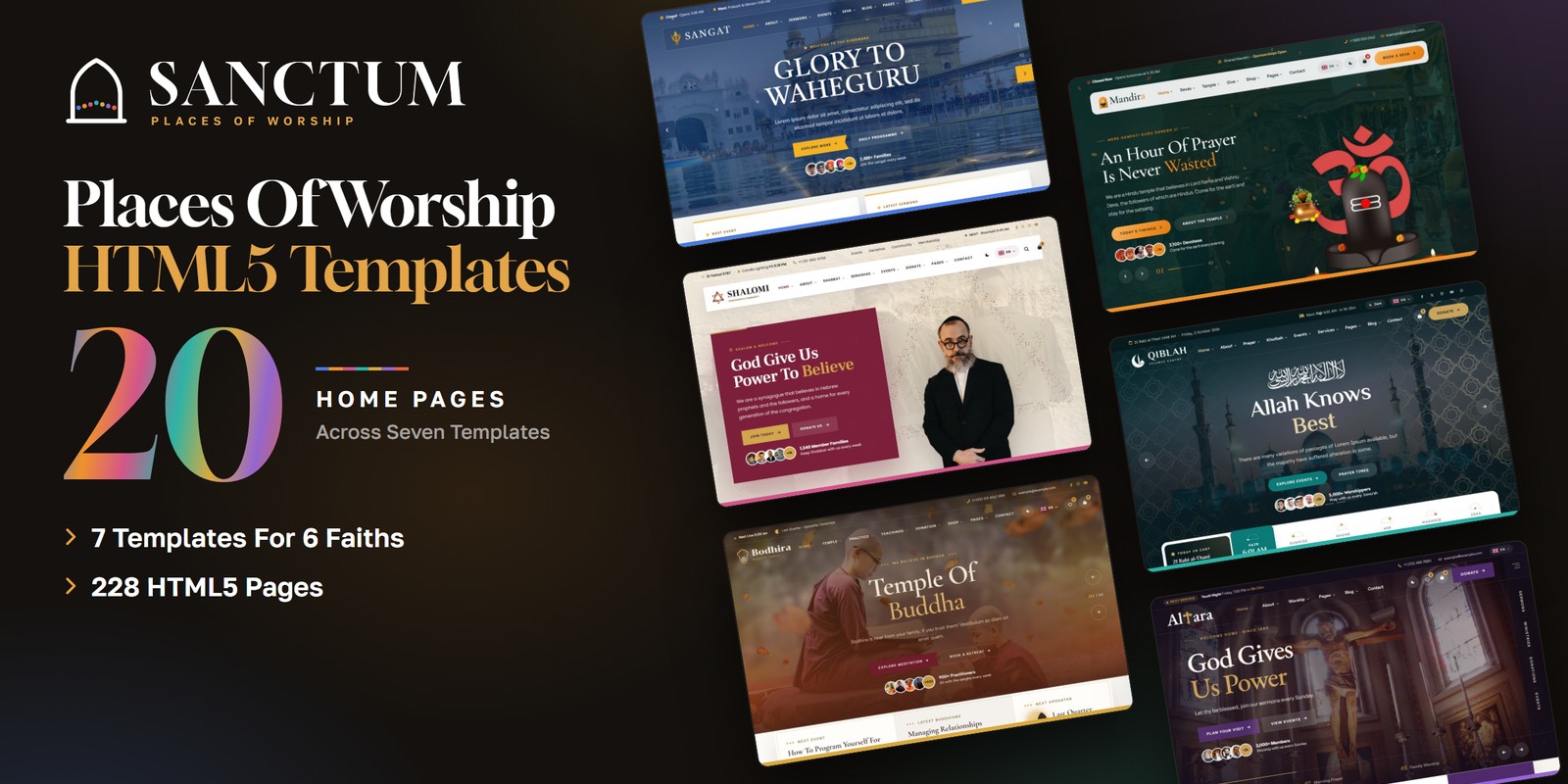
Sanctum is a suite of seven HTML templates for places of worship, built to one standard, and a landing page that presents them all. Every template is a complete product of its own: open a template’s folder and you have a finished site with its own pages, styles, scripts and mail handler.
What’s included
- Seven complete templates, each a standalone site in its own folder: Sangat (Sikh Gurdwara), Mandira (Hindu Mandir), Shalomi (Jewish Synagogue), Qiblah (Islamic Mosque), Bodhira (Buddhist Temple), Altara (Christian Church), Fidelis (Church Of Every Tradition)
- 228 HTML pages across the suite, 20 home pages to choose from, for 6 faiths
- The Sanctum landing page (
index.html): a mega menu with every template and its home pages, a card for each template that scrolls its full home page, a Giving & Ministries section, WebGL lights, light and dark mode and a language picker - Real logic in every template: prayer and service times, calendars and giving totals are worked out, not typed (see Settings & Logic)
- Light and dark mode, a flag language picker with right-to-left stylesheets, and a WebGL scene in every template
- One code standard: numbered CSS table of contents, numbered JS index, local plugins and icon fonts, reduced-motion fallbacks
- A working AJAX mail handler with optional reCAPTCHA v3 in every template
Getting Started
1. Open locally
Unzip the package and open sanctum/index.html for the landing page, or sanctum/<template>/index.html
for any template (for example sanctum/qiblah/index.html). No build tools or server are needed — every page,
slider and calculation works straight from the files.
2. Publish one template, or the whole suite
Each template folder is self-contained. To launch a single site, upload the contents of that one folder (for example
bodhira/) to your host. To publish the suite, upload the whole sanctum/ folder.
3. Customise
Every template keeps its styles in assets/css/style.css (numbered Table of CSS at the top) and
assets/css/responsive.css, and its scripts in assets/js/main.js (numbered JS INDEX). Colours and
fonts are CSS variables — see Colors & Fonts; the figures each template works with are
in Settings & Logic.
File Structure
index.html | The Sanctum landing page |
assets/ | The landing’s CSS, scripts (14 numbered blocks), fonts and images |
sangat/ … fidelis/ | The seven templates, one folder each: the HTML pages, assets/ and sendmail.php |
<template>/assets/css/ | style.css, responsive.css (breakpoints 1399 / 1199 / 991 / 767 / 575), their RTL twins and plugins/ |
<template>/assets/js/ | main.js and plugins/ (jQuery, Bootstrap, Swiper, GSAP, ScrollTrigger, Fancybox) |
<template>/assets/img/ | Images grouped by the section that uses them |
<template>/sendmail.php | The AJAX mail handler for that template’s forms (see Contact Form) |
Folder Structure
The package unzips to two folders: Documentation/ (this guide) and sanctum/, which holds the
landing page and its files at the top, then the seven templates, each a complete product of its own.
sanctum/
├── index.html                              the Sanctum landing page
├── assets/                                 the landing's own files
│   ├── css/                                style.css, responsive.css, fontawesome-all.css, plugins/
│   ├── js/                                 main.js (numbered JS INDEX), plugins/
│   └── img/                                brands/, flags/, giving/, homes/, logo/
├── sangat/                                 Sikh Gurdwara - 28 pages
├── mandira/                                Hindu Mandir - 32 pages
├── shalomi/                                Jewish Synagogue - 34 pages
├── qiblah/                                 Islamic Mosque - 32 pages
├── bodhira/                                Buddhist Temple - 34 pages
├── altara/                                 Christian Church - 30 pages
└── fidelis/                                Church Of Every Tradition - 38 pages
Inside a template
Every template folder is laid out the same way, so what you learn in one works in all seven.
qiblah/   (every template folder follows the same layout)
├── index.html, homepage-2.html ...         the home pages
├── *.html                                  every inner page
├── sendmail.php                            the AJAX mail handler for this template's forms
└── assets/
    ├── css/
    │   ├── style.css                       all custom styles, numbered Table of CSS
    │   ├── responsive.css                  breakpoints 1399 / 1199 / 991 / 767 / 575
    │   ├── style.rtl.css                   the right-to-left twin of style.css
    │   ├── responsive.rtl.css              the right-to-left twin of responsive.css
    │   ├── fontawesome-all.css             Font Awesome Free, local
    │   └── plugins/                        Bootstrap (+ its RTL build), Swiper, Fancybox
    ├── js/
    │   ├── main.js                         all custom scripts, numbered JS INDEX; the settings live here
    │   └── plugins/                        jQuery, Bootstrap, Swiper, GSAP, ScrollTrigger, Fancybox
    ├── webfonts/                           Font Awesome font files
    └── img/                                one folder per section, e.g. about/, avatars/, bg/, blog/, calligraphy/, events/, flags/, gallery/ ...
The Seven Templates
Every template has its own look, its own two fonts and its own class prefix (all of its CSS variables start with it).
| Template | Tradition | Pages | Homes | Fonts | Prefix |
Sangatsangat/ | Sikh Gurdwara | 28 | 2 | Tiro Gurmukhi + Noto Sans | --sg- |
Mandiramandira/ | Hindu Mandir | 32 | 3 | Cormorant Garamond + Manrope | --mn- |
Shalomishalomi/ | Jewish Synagogue | 34 | 3 | Frank Ruhl Libre + Poppins | --sh- |
Qiblahqiblah/ | Islamic Mosque | 32 | 2 | El Messiri + Readex Pro | --qb- |
Bodhirabodhira/ | Buddhist Temple | 34 | 3 | Cormorant Garamond + Albert Sans | --bd- |
Altaraaltara/ | Christian Church | 30 | 2 | EB Garamond + Instrument Sans | --al- |
Fidelisfidelis/ | Church Of Every Tradition | 38 | 5 | Newsreader + Be Vietnam Pro | --fd- |
Settings & Logic
Nothing that depends on the date is typed in: times, calendars and totals are worked out each time a page opens, so the
demo never goes stale. Each template keeps the figures it works with together, named, in its assets/js/main.js
(the JS INDEX at the top lists every block by number) or on the form that uses them. Change a value, save and reload —
every card, time and total that uses it follows. Prices are in US dollars.
Sangat — Gurdwara Clock
Open or closed in every top bar and the next prayer from Amrit Vela to Sukhasan, with today's hours in every footer. Open sangat/assets/js/main.js (or the page named) and search for the name in the first column.
OPEN_AT / CLOSE_AT | the gurdwara’s opening hours: the open or closed line in every top bar and today’s hours in every footer — block 08. Gurdwara Clock |
PROGRAMME | the day’s programme in 24-hour times: the next prayer and the item on now — block 08. Gurdwara Clock |
HALL_BOOKED | the days other families hold the darbar hall (days from today); a path that clashes offers the next free start — block 26. Path Booking |
path-booking.html | each path’s length, offering and hall days on its radio; langar per guest and the home-reading fee |
Mandira — Temple Almanac
Sunrise, sunset, rahu kalam, tithi, paksha and nakshatra for the temple's own latitude, longitude and time zone. Open mandira/assets/js/main.js (or the page named) and search for the name in the first column.
TEMPLE | the temple’s latitude, longitude and time zone: sunrise, sunset, rahu kalam, tithi and nakshatra — block 17. Almanac |
RAHU_PART | which eighth of the daylight is rahu kalam on each weekday — block 17. Almanac |
MUHURATS / CLOSING | the puja booking’s time slots and closing time; slots inside rahu kalam are left out — block 37. Puja Booking |
puja-booking.html | each ritual’s offering and length on its radio; add-ons carry data-price |
Shalomi — Shabbat Times
Candle lighting, Havdalah and the day's zmanim for twelve cities and any date, from the sun in each city's own time zone. Open shalomi/assets/js/main.js (or the page named) and search for the name in the first column.
CONGREGATION | your city, latitude, longitude, time zone and candle-lighting minutes: this Shabbat, the top bar and the live status — the top of the file, before block 01 |
FESTIVALS | the festivals by Hebrew month and day, turned into civil dates by the browser’s Hebrew calendar — the top of the file, before block 01 |
SERVICES | the weekly schedule: fixed times, or times that follow the sun ("sunset-20", "candles") — the top of the file, before block 01 |
shabbat-times.html | the city picker: each option carries its latitude, longitude, time zone and candle-lighting minutes |
Qiblah — Prayer Times
Fajr to Isha from the sun's position for any city, five calculation methods, iqamah times, Jumu'ah and a live next-prayer countdown. Open qiblah/assets/js/main.js (or the page named) and search for the name in the first column.
MASJID | the centre’s name, city, coordinates, time zone, calculation method, Asr school, iqamah, Jumu’ah, gold and silver prices and Zakat al-Fitr — the top of the file, before block 01 |
PRAYER_METHODS | the Fajr and Isha angles of each calculation method (ISNA, MWL, Egypt, Makkah, Karachi) — block 09. Prayer Engine |
events | each event carries a rule, not a date: data-hijri="9-1" or data-weekly="5" |
Bodhira — Lunar Calendar
The moon's phase, Uposatha days, full moons, festivals and the date of Vesak, with the next observance in every footer. Open bodhira/assets/js/main.js (or the page named) and search for the name in the first column.
TEMPLE | one data block: the daily schedule (and what is live), classes, retreats, rooms and extras, the early rate, causes, the shop and the teachings — block 09. Temple Data |
Altara — Service Clock
Live Now during a service, otherwise the next service and a countdown, and events that date themselves from repeat rules. Open altara/assets/js/main.js (or the page named) and search for the name in the first column.
SERVICES | the weekly services: the service clock’s Live Now, the next service and its countdown — block 09. Church Data |
EVENTS | events with repeat rules, so they never go out of date — block 09. Church Data |
CAUSES / GIVING | causes with raised, goal and days left; the give form’s presets, minimum and card fee — block 09. Church Data |
KIDS_ROOMS | the Plan Your Visit wizard’s children’s rooms by age — block 09. Church Data |
Fidelis — Liturgical Year
Today's season, week and colour, the Sunday and weekday reading cycles, coming feasts and the date of Orthodox Pascha. Open fidelis/assets/js/main.js (or the page named) and search for the name in the first column.
SERVICES / STREAMED | the weekly gatherings and which are streamed: the next-gathering line, its countdown and Live Now — block 12. Next Service |
CAMPUSES | each campus’s opening hours: every open or closed line — block 45. Campus Hours |
EVENTS / SERMONS | the events calendar and the sermon player — block 42. Events Calendar |
data-when | dates written as days from today (+12, w0+1) and painted again in the browser |
data- attributes. To add one, copy an existing option and change its figures.Colors & Fonts
Each template is driven by the CSS variables at the top of its style.css: colours are
--<prefix>-color-* and the fonts are its two --<prefix>-ff- variables (heading and
body). Change a token once and every section follows. Colours used with transparency have an -rgb twin —
change both together. The landing uses the --sc- prefix:
--sc-night--sc-paper--sc-ink--sc-lamp--sc-heading--sc-textFonts
Two Google Fonts are loaded in the head of every page of a template (see the table in The Seven
Templates); the landing uses Gloock for headings and Golos Text for text. To swap a
font, edit the Google Fonts link and the two -ff- variables.
Light & Dark Mode
Every template and the landing have a light and a dark theme on one switch. The switch sets data-theme="dark"
on the <html> tag and remembers the choice in the browser; a short script in the head applies the saved
choice before the page paints, so a dark visitor never sees a light flash. Every colour role has a dark value in the dark
block of style.css, so a new section built from the tokens works in both themes.
| Template | Theme key | Language key | Direction key |
| Sangat | sangat-theme | sangat-lang | sangat-dir |
| Mandira | data-theme | mandira-lang | mandira-dir |
| Shalomi | sh-theme | sh-lang | sh-dir |
| Qiblah | qiblah-theme | qiblah-lang | qiblah-dir |
| Bodhira | bodhira-theme | bodhira-lang | bodhira-dir |
| Altara | al-theme | al-lang | al-dir |
| Fidelis | fd-theme | fd-lang | fd-dir |
style.css to ship light only; for dark only, also set data-theme="dark" on <html>.Languages & RTL
Every template has a language picker (a flag and a code) listing the languages that read left to right and right to left.
The demo copy stays in English — you bring your own. Choosing a right-to-left language stores the language and the
direction (the keys above) and reloads; the head script then sets dir="rtl" and swaps the three stylesheets for
the files named in their data-rtl attribute before the page paints. The layout, sliders and animations all
mirror. To make a page right to left for good:
1. Set the direction
<html lang="ar" dir="rtl">2. Swap three stylesheets
assets/css/plugins/bootstrap.min.css | → assets/css/plugins/bootstrap.rtl.min.css |
assets/css/style.css | → assets/css/style.rtl.css |
assets/css/responsive.css | → assets/css/responsive.rtl.css |
The scripts read the direction from the dir attribute, so every move that must mirror follows it on its own.
A site that is right to left everywhere can then drop the right-to-left languages from the picker.
style.rtl.css and responsive.rtl.css are mirrored
twins of the LTR files, made with RTLCSS. A few hand-made rules at the end of style.rtl.css (after RTL
fixes) keep what must not mirror. If you change style.css, regenerate the twin with
npx rtlcss style.css style.rtl.css and copy the RTL fixes block back to its end.WebGL Scenes
Each template has a WebGL scene of its own, tinted by its theme colours, and the landing has lights rising from its hero arches. A scene only runs while its section is on screen and the tab is visible; visitors who prefer reduced motion get a still frame, and without WebGL the section’s own background shows. To remove one, delete its canvas — nothing else depends on it.
| Sangat | Sarovar Light on the water |
| Mandira | WebGL silk |
| Shalomi | a Magen David of gold light |
| Qiblah | an eight-point star lattice |
| Bodhira | incense smoke, gold dust, silk and ripples |
| Altara | light rays from a high window |
| Fidelis | light shafts and stained-glass light |
JavaScript Guide
Every main.js in the suite is organised the same way: a numbered JS INDEX at the top, then one self-contained
block per feature that skips pages where its section is not present — delete any block you do not need. Every
animation respects prefers-reduced-motion: content appears in its final state.
Images
The package ships neutral placeholder images so every layout shows at the right size. Replace them with your own photos
using the same file names and dimensions. The landing’s images are grouped in sanctum/assets/img/:
img/brands/ | The seven template logos — 758×220, 954×266, 508×155, 613×156 |
img/flags/ | The language picker’s flags (SVG) — SVG |
img/giving/ | The Giving & Ministries section: one giving and one serving photograph per template — 480×300 |
img/homes/ | Home-page captures for the mega menu and the template cards (full/ holds the tall captures that scroll; thumbs/ the small ones) — 1200×750, 480×300, 600×1000, 720×5887 |
img/logo/ | Sanctum logo, light logo, mark and favicon — 1176×209, 64×64, 512×512 |
Each template groups its images the same way, one folder per section. The logos, flags and each template’s own artwork are included and ready to use; the demo photography on the live preview is for preview only and is not included in the download.
Contact Form
The forms in each template post to that template’s own sendmail.php, a lightweight AJAX mail handler; the
message appears under the button without reloading the page. Booking, giving, checkout and account forms are demo forms that
confirm on screen, ready to connect to your own systems. To activate the mail handler:
1. Set your email address
Open sendmail.php in the template folder and replace the placeholder recipient at the top of the file:
$email = 'example@example.com';2. Upload to a PHP host
The form needs a server with PHP mail() support (virtually every shared host). It will not send from your own
computer or from a static-only host.
3. Optional: enable Google reCAPTCHA v3
Invisible reCAPTCHA v3 is built into the handler and stays off until you add keys: create v3 keys for your domain in the
Google reCAPTCHA admin console, replace
YOUR_RECAPTCHA_V3_SECRET_KEY in sendmail.php with your secret key, then add a hidden
g-recaptcha-response field to the form and load the reCAPTCHA script with your site key before
</body>.
Credits
The suite is built with the following open-source libraries and resources.
- Bootstrap 5.3
- jQuery 3.7.1
- Swiper 11
- GSAP 3 + ScrollTrigger
- Fancybox 3.5
- Font Awesome Free 6
- Flaticon icon fonts (Shalomi, Bodhira)
- RTLCSS
- flag-icons (MIT)
- Google Fonts: Albert Sans, Be Vietnam Pro, Cormorant Garamond, EB Garamond, El Messiri, Frank Ruhl Libre, Gloock, Golos Text, Instrument Sans, Manrope, Newsreader, Noto Sans, Poppins, Readex Pro, Tiro Gurmukhi
All plugin files and icon fonts are loaded locally. The only external requests are the Google Fonts stylesheets and, where a page has them, the map and video embeds.
Support
Six months of dedicated support and every future update are included. Support is available through the marketplace where you purchased Sanctum: open the item there and send us your question from its support page. Item support covers questions about the templates’ features, bug fixes and help with the included third-party assets. We aim to respond within 24–48 hours.